 Jonker IT

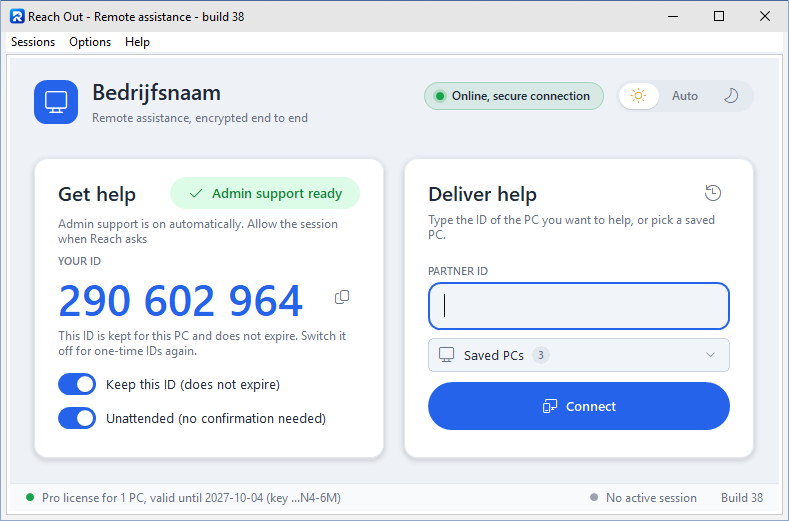
Reach Out is remote support on your own server: you see and control a customer’s or colleague’s computer as if you were sitting next to it. End-to-end encrypted and direct between the two PCs whenever the network allows. Free to download and use; with a Pro license, without limits.
 (Click to enlarge)
1How it works
- Install the server. Download Reach Out server and install it on one PC that stays on, or on a Windows server or VPS. Leave “Also install Reach Out on this PC” ticked, so you can help from that PC straight away.
- Install Reach Out on the other PCs. Download Reach Out on every PC that gives or gets help. At its first start Reach Out asks once for your server’s address. Even easier: let your server’s Manager make a Reach Out with your server built in, and hand that out.
- Help. The person who needs help reads out a 9-digit ID and you type it in. They click Allow, and you see and control their screen.
Your server must be reachable for the PCs you help: within your own network that is automatic, over the internet once you open the ports the setup mentions (UDP 47800, and as a fallback TCP 8443, 443 or 80).
2What it does
- Connected in seconds. A 9-digit ID works once and expires after 10 minutes, or the PC keeps a fixed ID if you like.
- Smooth picture and sound. A sharp picture at up to 60 frames per second, encoded by the graphics card (H.264), the other PC’s sound and several screens with live thumbnails.
- Full screen and sharp text. One click or F11 for your whole screen, and choose how the picture is scaled: smooth, sharp pixels or original size.
- Works on difficult networks. Hotspots, hotels and company networks that block the usual connection are no problem: Reach Out picks another route by itself, still end-to-end encrypted.
- Connection test. Help > Test the connection shows step by step how a PC reaches your server and the internet, in a report you can copy.
- Files, chat and clipboard. Drop files on the picture and they arrive on the other PC. Chat during the session, and copy and paste works between both PCs.
- Admin tasks, UAC and the sign-in screen. With the Reach Support Agent service you keep working when a UAC prompt or the Windows sign-in screen appears, after the person at the PC has given permission.
- Restart and carry on. Restart the other PC from your toolbar; Reach Out reconnects by itself.
- Works with Remote Desktop. Reach Out keeps showing a PC used through Remote Desktop, even when that window is minimized or closed.
- Your own server, easy to manage. The server runs as a Windows service. The Manager shows who is online, makes daily encrypted backups and starts with Windows as an icon next to the clock.
3Safe by design
- End-to-end encrypted. AES-256 with a new key for every session. Picture, keystrokes and files go directly from PC to PC; when that is not possible, your server passes on the sealed packets without being able to read them.
- Your server, your data. Sessions run through your own server, not through us.
- Check number. Both screens show the same check number, so you know you are connected to the right computer.
- Nothing without permission. The person at the other PC clicks Allow first.
- Licenses and updates that cannot be forged. Licenses and updates are digitally signed and checked.
4Free and Pro
Everyone can download and use Reach Out and the server for free. Whether you have the free version or Pro depends on your server: with a Pro server license all limits are gone.
| Free | Pro | |
|---|---|---|
| Help with permission: screen, mouse, keyboard, chat, files, sound | ✓ | ✓ |
| Admin rights, UAC and sign-in screen, remote restart | ✓ | ✓ |
| PCs on your server | up to 5 | unlimited |
| Session time | 60 minutes per PC per day | unlimited |
| Your company name in Reach Out (and your logo) | – | ✓ |
| Hand out Pro licenses to your helper PCs: unattended access, several PCs at once, session recording, automatic updates | – | ✓ |
| Support log and session reports for your invoices, with Excel export | – | ✓ |
| Usage reports by e-mail | – | ✓ |
During a free session Reach Out shows how much time is left, warns 5 minutes before the end and then closes the session neatly.
5Ordering Pro
- Look up your server ID. In your server’s Manager: Settings > Server license > Copy server ID.
- Ask for a quote through the contact page, with your server ID, your company name and the number of helper PCs. Pro costs a fixed amount plus a price per helper PC.
- License active. After payment you receive your server license by e-mail. Paste it in the Manager under Settings > Server license, and your server is Pro at once.
The license belongs to your server and shows your company name. Your server checks the license once a day.
6Download
For Windows 10 and 11. Start with the server; then Reach Out on the other PCs.
| Download | For |
|---|---|
| Reach Out server | The PC or server that connects the PCs. With the Manager, and if you like Reach Out on the same PC. Asks for administrator rights. |
| Reach Out | Every PC that gives or gets help. Installs for everyone on the PC, with the Reach Support Agent service for UAC prompts and the sign-in screen. Asks once for administrator rights. |
| Reach Out without administrator rights | For a PC where you are not an administrator. Works without the Reach Support Agent, so without UAC prompts. |
| Reach Out for Mac (beta) | For a Mac with macOS 26 or later. Helps a Windows PC or gets help itself, through the same Reach Out server. Open the .dmg and drag Reach Out to Applications. Beta: the first time, open the app with right-click › Open. To get help on the Mac, allow Screen & System Audio Recording and Accessibility in System Settings › Privacy & Security. |
By downloading Reach Out you agree to the terms of use: use at your own risk.