 Jonker IT
Reach Out is remote assistance the way it should be: you see and control a customer’s or colleague’s computer as if you were sitting next to them. Encrypted end to end and direct between the two PCs whenever the network allows. On networks that block that, the server passes the packets on, still sealed, so it can never see the screen.
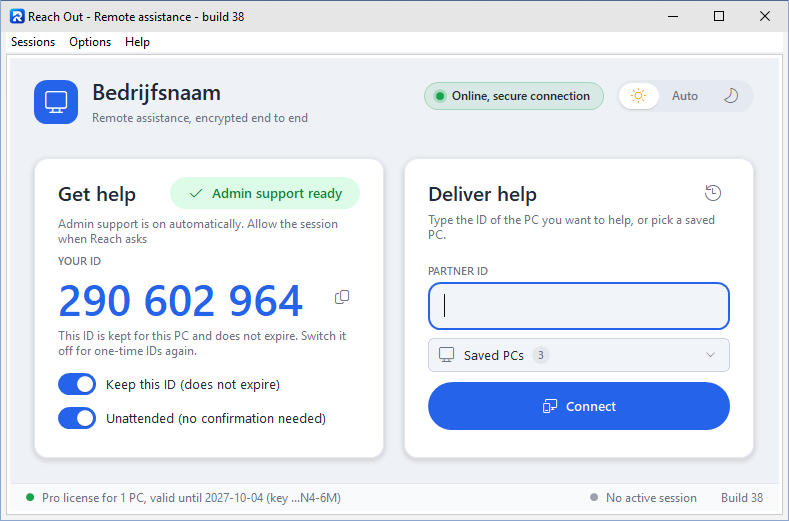 (Click to enlarge)
1What it does
- Connected in seconds. The person who needs help reads out a 9-digit ID and you type it in. The ID works once and expires after 10 minutes, or the PC keeps a fixed ID if you prefer.
- Several PCs at once, in tabs. Help more than one computer at the same time. Every PC gets its own tab in one window, like the tabs of a web browser, with its own toolbar.
- Smooth picture and sound. Crisp video encoded by the graphics card (H.264), the other PC’s sound, and multiple screens with live thumbnails. Push the mouse against the edge to move on to the next screen.
- Full screen and sharp text. Give the other PC your whole screen with one click or F11, and choose how the picture is scaled: smooth, sharp pixels, or original size.
- Works on difficult networks. Phone hotspots, hotels and company networks that block the usual connection are no problem: Reach Out switches to another route by itself. And when two PCs cannot reach each other directly, the session runs through the server, still encrypted end to end.
- Connection test. Help > Test the connection shows step by step how a PC reaches the server and the internet, in a report you can copy and send.
- Files, chat and clipboard. Drop files on the picture and they arrive on the other PC, with progress shown. Chat during the session, and copy and paste works between both PCs.
- Admin tasks, UAC and the sign-in screen. The Reach Support Agent service lets you keep working when a UAC prompt or the Windows sign-in screen appears, after the person at the PC has given permission.
- Restart and carry on. Restart the other PC from your toolbar; Reach Out connects again by itself once it is back.
- Works with Remote Desktop. Reach Out keeps showing a PC that is used through Remote Desktop, also while that Remote Desktop window is minimized or closed (for example a virtual machine on Proxmox or Hyper-V).
- Unattended access to your own PCs. Connect to your own computers at any time, also when nobody is there, with a fixed ID and Reach Out starting with Windows.
- Your address book everywhere. Give the PCs you help a name, and keep that list the same on all your own PCs.
- For your records. Record a session to an MP4 video, and keep a session history (who, when, how long, files and chats) that you can export to Excel.
- Personal. The person being helped sees who is helping, with name and photo, and your company name and logo with Corporate.
- Day and night. A light and a dark look that follows Windows, or that you choose yourself.
- Always up to date (Pro and Corporate). New versions install themselves, without questions, when Reach Out is not in use, and Reach Out restarts on the new version by itself. Each update is digitally signed and checked before it is installed.
2Safe by design
- Encrypted end to end. AES-256 with a fresh key for every session. The picture, keys and files go straight from PC to PC; the server helps the two find each other. When a network makes a direct path impossible, the server passes the sealed packets on without being able to read them.
- Check code. Both screens show the same check number, so you know for sure you are connected to the right computer.
- Nothing happens without permission. The person at the other PC clicks Allow first. With unattended access a red bar stays on screen the whole time, with a Stop button.
- Licenses and updates that cannot be forged. License keys and updates are digitally signed and checked by Reach Out itself.
3Free, Pro and Corporate
Everyone can use Reach Out for free. Pro (home or business) adds the features for people who help a lot, and Corporate gives your organization its own Reach Out server with professional management. The business features below are not part of the free license.
| Feature | Free | Pro | Corporate |
|---|---|---|---|
| Help with permission: screen, mouse and keyboard | ✓ | ✓ | ✓ |
| Chat, files, clipboard, sound, several screens | ✓ | ✓ | ✓ |
| Sessions through the server when no direct path works | up to 2 Mbit/s | full speed | full speed |
| Admin rights, UAC and sign-in screen, remote restart, fixed ID | ✓ | ✓ | ✓ |
| Automatic, signed updates without questions | – | ✓ | ✓ |
| Help several PCs at once, in tabs | – | ✓ | ✓ |
| Unattended access to your own PCs | – | ✓ | ✓ |
| Saved IDs synced between your PCs | – | ✓ | ✓ |
| Session recording (MP4) | – | ✓ | ✓ |
| Your own Reach Out server | – | – | ✓ |
| Your company name, logo and colour in Reach Out | – | – | ✓ |
| Issue Pro licenses to your own PCs, and push them instantly | – | – | ✓ |
| Support log of every session, with export to Excel | – | – | ✓ |
| Session reports after every session: customer, work done, minutes to bill | – | – | ✓ |
| Usage reports by e-mail: daily, weekly or monthly | – | – | ✓ |
| E-mail through Microsoft 365 with OAuth (certificate or client secret) or any SMTP server | – | – | ✓ |
| Daily encrypted backups, also to an SFTP server | – | – | ✓ |
| Manager with password protection, starting with Windows | – | – | ✓ |
A free helper can always assist a PC with Pro; for unattended access it is the PC being helped that needs Pro.
4Corporate: your own Reach Out server
With Corporate, your organization runs the Reach Out server itself, on its own Windows server (a VPS works well). Your helpers and the people you help connect through it, and you are in charge.
- Your brand. Your company name, logo and colour appear in Reach Out on every PC, also on the screen where the person being helped clicks Allow.
- Your own Reach Out. Make one Reach Out program with your server and brand built in. Hand it out; it connects straight away, without settings.
- Your licenses. Issue Pro licenses to your own PCs, renew or change them, and push a license to a connected PC instantly.
- Session reports for your invoices. After every session the helper fills in a short form: the customer, a contact person, what was done and the minutes to bill. Date, times and the PC are filled in already, measured by your server. All reports are on your server, in the usage report e-mail with billable time per customer, and in an Excel/CSV export for your invoicing.
- Insight. A support log of every session (who helped whom, when and for how long) with export to Excel, and a usage report by e-mail every day, week or month: sessions, total and average time, per helper and per PC.
- Professional e-mail. License keys, order notices and reports go out through Microsoft 365 with OAuth (Microsoft Graph), signing in with a certificate or a client secret, so no mailbox password is stored. Any other mail provider works over SMTP. Built-in connection tests and a test e-mail show exactly what is wrong, with tips.
- Safe and easy to manage. The server runs as a Windows service, also when nobody is signed in, and makes an encrypted backup every day, also to an SFTP server. The Manager shows who is online and what is happening, keeps its settings on clear tabs with an explanation for each, starts with Windows as an icon next to the clock, and can be protected with a password.
- Always up to date, inside your own network. Your server fetches every new Reach Out from us, checks its signature and hands it to your PCs, so they update without going to the internet themselves, keeping your server address and brand.
- Works through strict firewalls. Besides its usual port, your server listens on fallback ports such as 8443 and 443, which you set on a tab in the Manager. It opens them in Windows Firewall by itself.
Corporate is priced as a base fee plus a price per helper PC. You receive the server software together with your server license. Ask for a quote via the contact page, or order it in the app.
5Pricing
Reach Out is free to use. For Pro, as a person (home) or a company (business), these prices apply:
| Term | Home (1 PC) | Business (per PC) |
|---|---|---|
| 1 year | € 24 | € 36 |
| 2 years | € 42 | € 63 |
| 5 years | € 90 | € 135 |
| Lifetime | € 180 | € 270 |
Prices exclude 21% VAT. A home license needs a personal e-mail address; a business license uses your company’s own e-mail domain. Corporate: on request.
6How to order
- Order in the app. Under Help > License you choose Home, Business or Corporate, the number of PCs and the term. You see the total price right away.
- Invoice by e-mail. You receive an invoice. Until payment you simply keep working with the free version.
- License active. After payment you receive the key by e-mail and Reach Out switches over to it by itself. Corporate customers receive their server license and the server software.
7Download
- For Windows 10 and 11. One setup for the whole PC. It installs Reach Out for everyone on the computer together with the Reach Support Agent service, so a helper can also work with UAC prompts and at the sign-in screen. Windows asks once for administrator permission during the installation.
- Always up to date with Pro or Corporate. New versions install themselves, without questions, when Reach Out is not in use. Every update is digitally signed and checked before it is installed.
- Free to use, with Pro or Corporate for business use.